
Question Banks for Online Assessments
Build Question Banks That Make Every Exam Unique
SimpliTrain’s question bank gives you a structured, scalable library of questions that powers every assessment you run. You can tag, organise, and randomise questions across topics, difficulty levels, and competencies so no two exam attempts are ever identical.

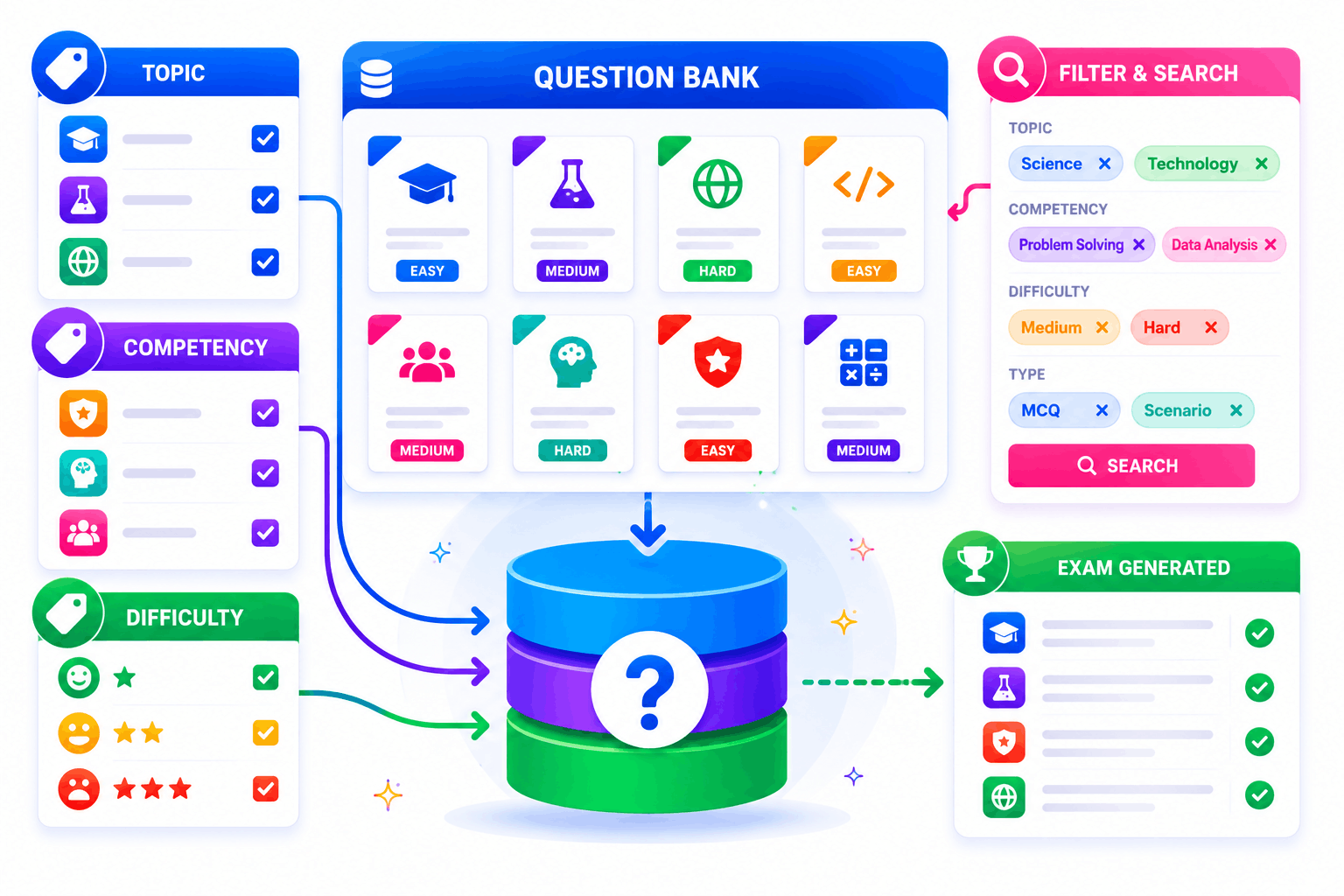
Tag and Organise Questions Across Topics and Difficulty
SimpliTrain lets you build a structured question library by tagging every item with topic, competency, difficulty level, and question type. When you create an exam, the system draws from the bank based on the rules you set. You are never manually assembling questions one by one for every test version. This makes managing banks of hundreds or thousands of questions straightforward for large certification programs.
- Topic and competency tagging
- Difficulty level classification
- Multi-tag filter and search
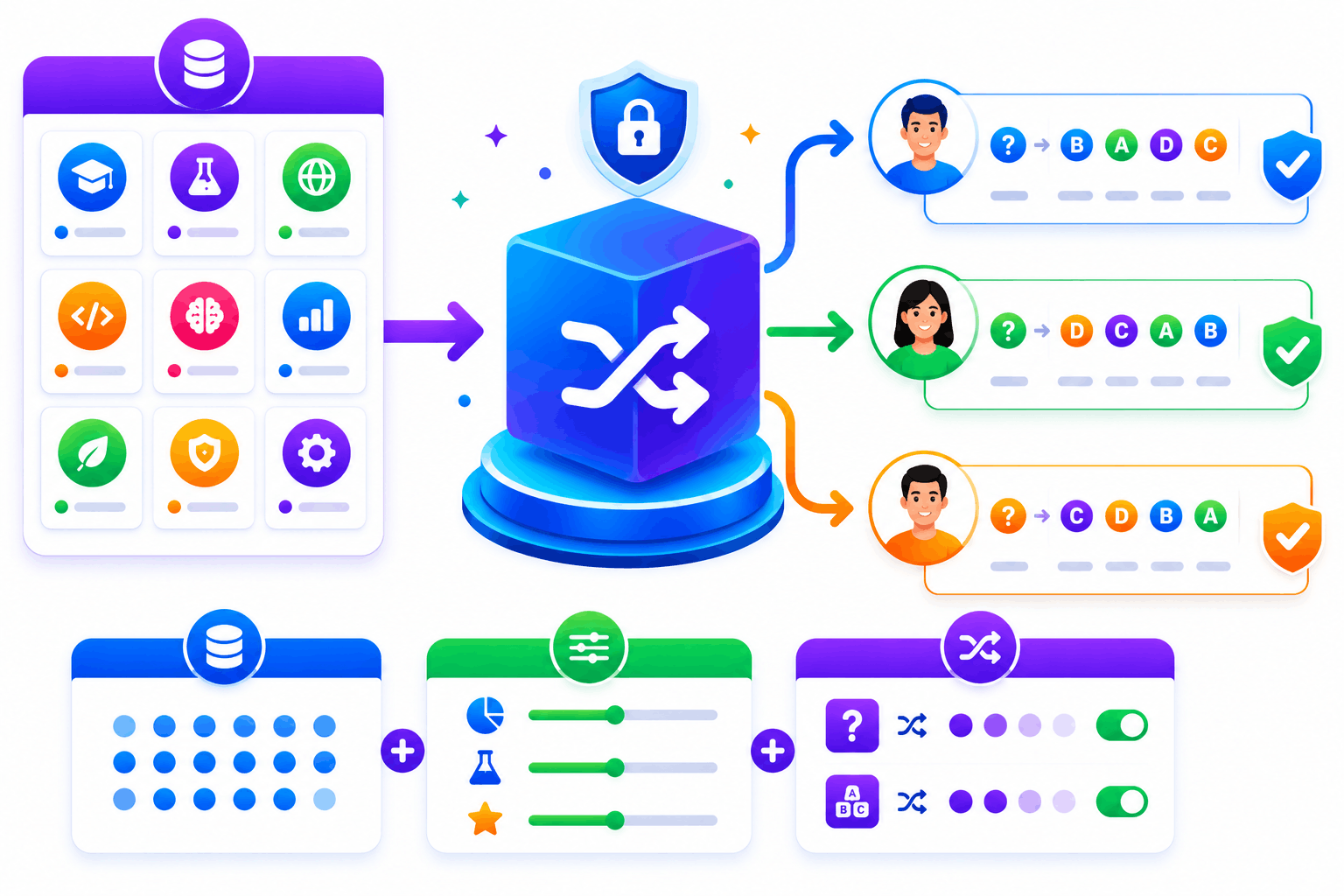
Randomisation That Protects Exam Integrity at Scale
SimpliTrain randomises question selection and answer order for every exam attempt drawn from your bank. Each learner receives a unique combination of questions pulled from the same pool within defined parameters. This directly reduces the risk of answer sharing in proctored and high-stakes certification environments. You control the randomisation rules, including how many questions are drawn per topic and difficulty tier.
- Per-attempt question randomisation
- Answer order shuffling
- Pool size and draw rules
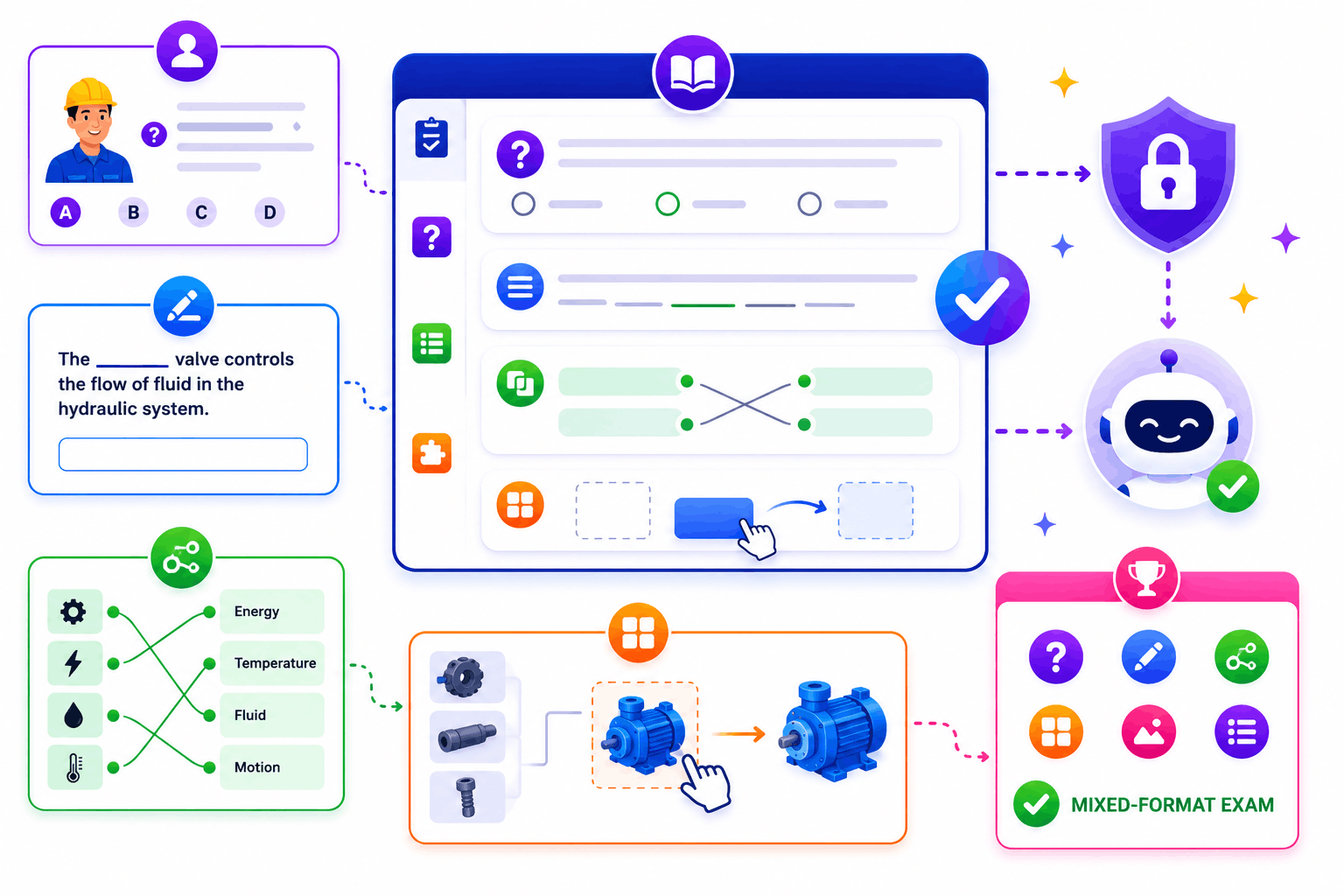
Question Types Built for Technical and Applied Training
SimpliTrain supports multiple question formats beyond standard multiple choice, including fill-in-the-blank, matching, drag-and-drop, and scenario-based questions. You can mix formats within a single exam to test both recall and applied judgment. Each question type is fully compatible with the AI evaluation and auto-grading engine.
- Scenario-based question support
- Drag-and-drop and matching types
- Mixed-format exam compatibility
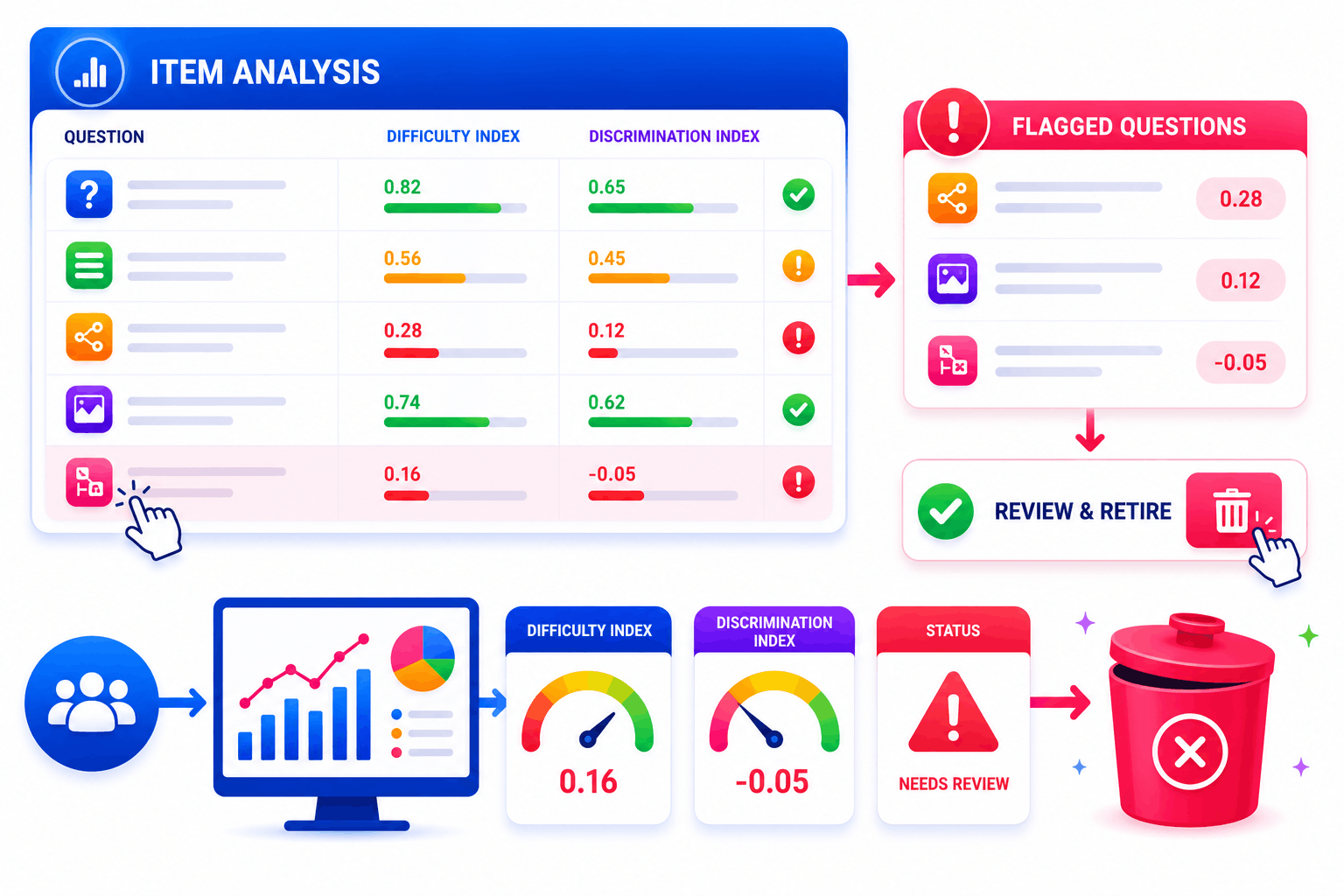
Item Analysis That Flags Weak Questions Automatically
SimpliTrain tracks how every question performs across learner attempts and surfaces difficulty index and discrimination index scores per item. Questions that are consistently answered incorrectly or show poor discrimination are flagged for review. You can retire, revise, or replace flagged items directly from the bank without disrupting live exams.
- Difficulty index tracking
- Discrimination index alerts
- One-click question retirement
Import, Export, and Reuse Questions Across Programs
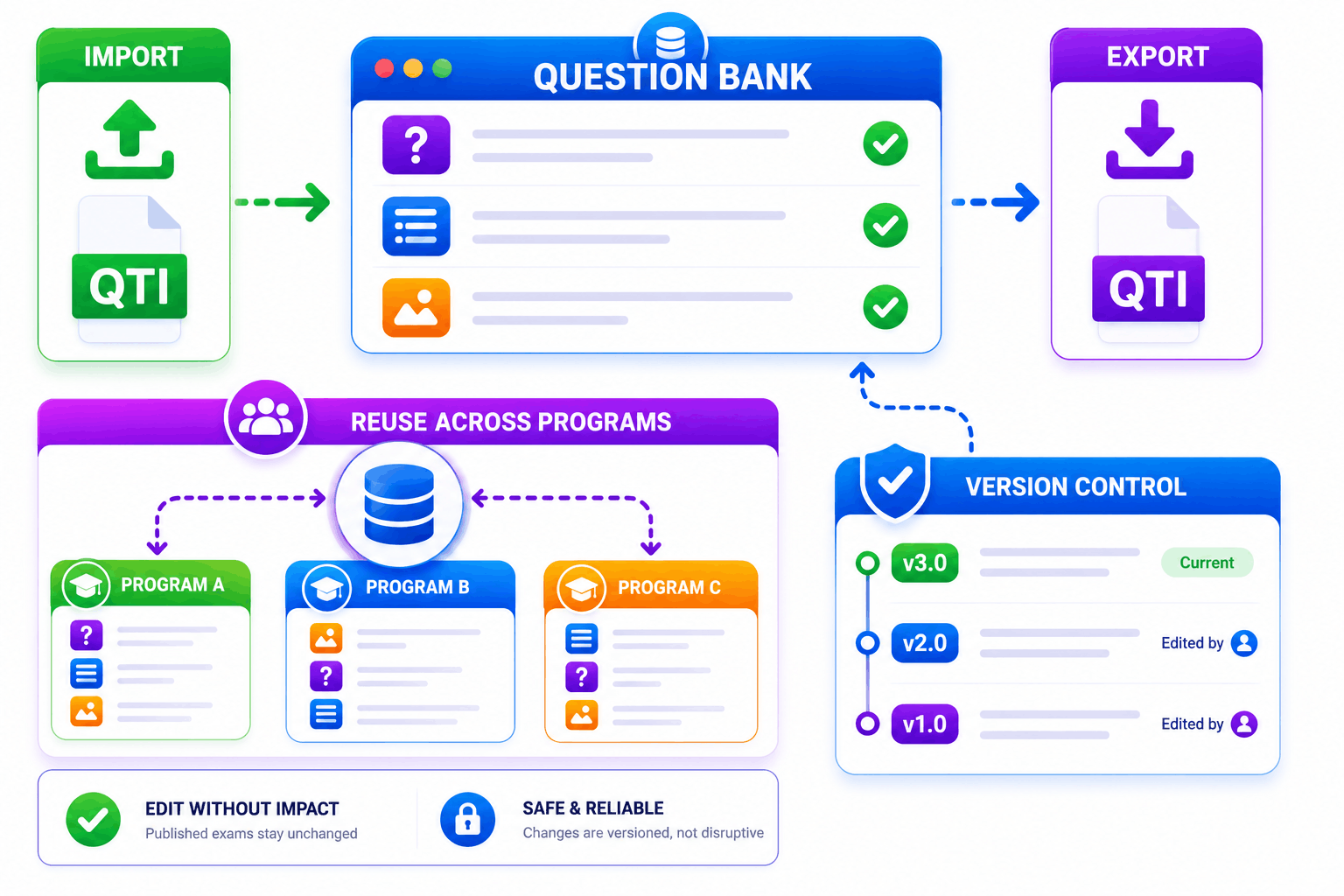
SimpliTrain supports QTI-format import and export so you can bring existing question libraries into the platform or move content between systems. You can reuse questions across multiple exams and programs without duplicating entries in the bank. Version control ensures that edits to a question do not affect exams that are already published or in progress.
- QTI import and export
- Cross-program question reuse
- Version control per question
Upload Your First SCORM Course Into
SimpliTrain Today!
Frequently Asked Questions
1. How do I get started with SimpliTrain's Agentic AI Evaluation?
You can sign up for a free SimpliTrain account and access the assessment builder immediately. The onboarding flow walks you through creating your first AI-evaluated exam in under 30 minutes. No implementation support is required for standard setups.
2. What types of assessments does SimpliTrain's AI evaluation support?
SimpliTrain supports multiple-choice, multi-select, open-ended written responses, scenario-based questions, and case study submissions. The Agentic AI Evaluation engine is designed specifically for formats that require contextual judgment. Fixed-format question types are also fully supported within the same exam.
3. Can SimpliTrain integrate with our existing LMS or HR systems?
SimpliTrain connects with major HRMS, LMS, and HRIS platforms via API and supports SCORM and xAPI standards. You can push assessment results and completion data to your existing systems without manual exports. Integration setup is handled through SimpliTrain’s configuration panel without developer support in most cases.
4. How does the adaptive questioning feature decide when to escalate difficulty?
SimpliTrain’s adaptive engine uses item response theory logic to calculate a running ability estimate after each answer. When that estimate crosses a defined threshold, the system pulls a question from the next difficulty tier. You set the thresholds and the question pool structure during exam configuration.
5. Which SimpliTrain plan includes Agentic AI Evaluation?
Agentic AI Evaluation is available on SimpliTrain’s Growth and Enterprise plans. You can review plan-level feature access on the SimpliTrain pricing page or request a demo to see it applied to your specific use case. Free trial access includes a limited evaluation quota for testing purposes.
6. What does the exam experience look like for learners?
Learners access exams through their SimpliTrain dashboard on any device, including mobile. The interface is clean, timed where configured, and does not expose AI scoring logic to the test-taker. They receive results and feedback immediately after submission based on your configured disclosure settings.
7. How does SimpliTrain protect learner data and exam integrity?
SimpliTrain stores all assessment data on encrypted infrastructure with role-based access controls. Exam content, learner responses, and AI evaluation outputs are never used to train external models. You retain full data ownership and can export or delete records at any time in line with your data governance requirements.
